
May 03, 2026

Gaming Ergonomics & Healthy Play Sessions

We often think of casual browser games as harmless quick breaks. While they are fantastic for mental relaxation and cognitive exercise, the physical act of playing them—hunched over a keyboard, staring intently at a glowing monitor, repeatedly clicking a mouse—can take a severe toll on the human body if done incorrectly. The modern digital lifestyle has seen a massive rise in repetitive strain injuries (RSIs), digital eye strain, and posture-related chronic pain. However, gaming does not have to come at the expense of your physical health. By implementing a few key ergonomic principles and structuring your play sessions intelligently, you can enjoy endless hours of entertainment while maintaining peak physical condition.

The 20-20-20 Eye Rule

One of the most immediate physiological impacts of gaming is on the eyes. When we stare at a screen, our blink rate drops significantly—sometimes by as much as 60%. This leads to dry, irritated eyes. Furthermore, the constant focus on a near object (the monitor) causes the ciliary muscles in the eye to spasm, resulting in blurred vision and tension headaches. This collective set of symptoms is known as Computer Vision Syndrome or Digital Eye Strain.

The most effective defense against this is the 20-20-20 rule, championed by optometrists worldwide. The rule is simple: Every 20 minutes, stop looking at your screen and look at an object that is at least 20 feet away for a minimum of 20 seconds. This 20-second break allows the eye muscles to relax and reset to their natural resting state. Additionally, make a conscious effort to perform a series of "hard blinks" during this time to re-lubricate the cornea. Installing a simple timer extension in your browser can help automate this crucial habit.

Proper Posture Setup

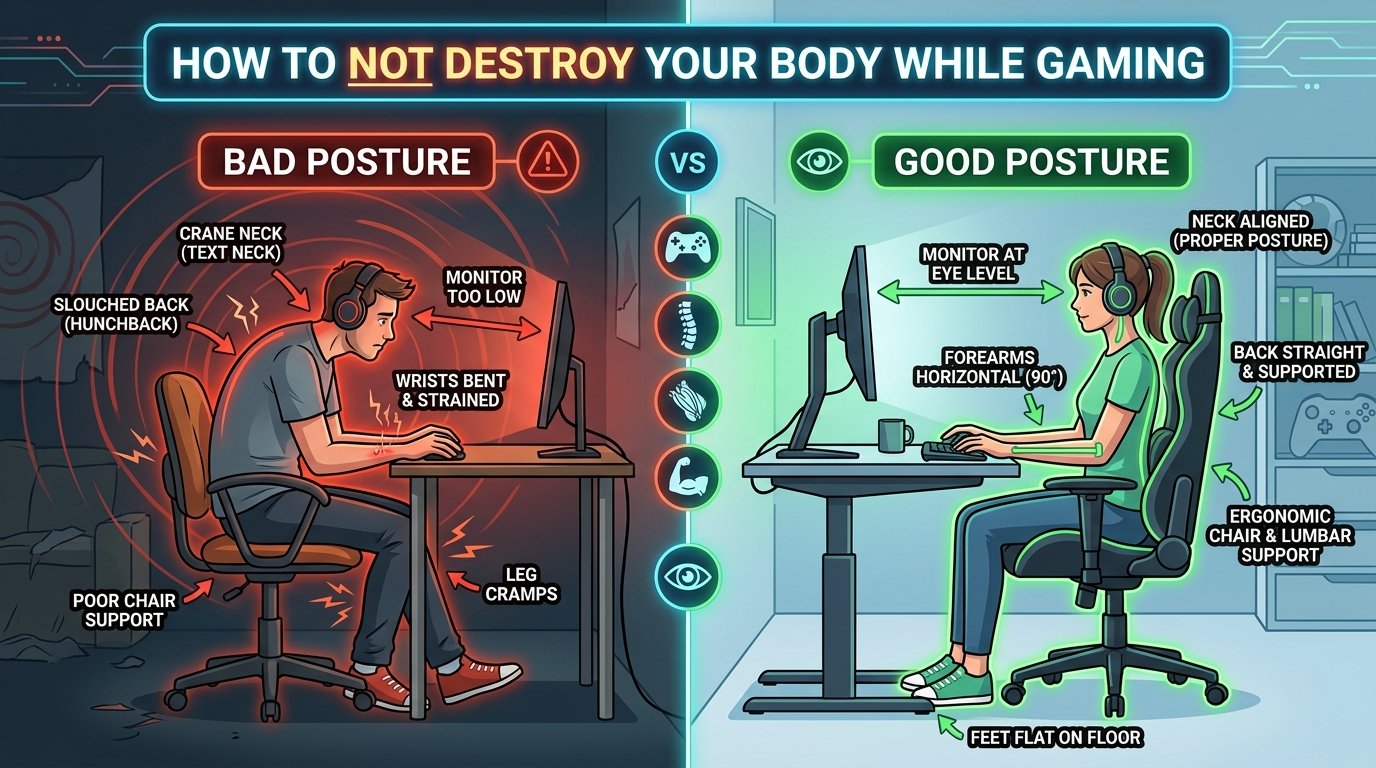
Your spine is not designed to support a "gamer lean." Hunching forward places an enormous amount of exponential weight on your cervical spine. If your head shifts forward just two inches, the load on your neck muscles increases by roughly 20 pounds. Over time, this leads to anterior pelvic tilt, rounded shoulders, and severe lower back pain.

A proper ergonomic setup starts with your chair and desk height. Your feet should be planted flat on the floor, with your knees bent at a 90-degree angle. Your lower back should be supported by the chair's lumbar curve. When your hands are on the keyboard and mouse, your elbows should be at a 90 to 100-degree angle, resting comfortably by your sides. Finally, the top third of your monitor should be perfectly level with your eyes, preventing you from constantly looking down. If you are playing on a laptop, consider investing in a laptop stand and an external keyboard to separate the screen from the input devices.

Wrist Tendinitis Prevention

Casual games often require rapid, repetitive clicking. This constant micro-movement, especially when performed with a bent wrist, creates intense friction in the carpal tunnel. The tendons can become inflamed, leading to tendinitis or Carpal Tunnel Syndrome—conditions that can cause chronic pain, numbness, and permanently hinder your ability to type or play.

The golden rule of wrist ergonomics is the "neutral position." Your hand, wrist, and forearm should form a straight, horizontal line. Do not rest your wrists on the sharp edge of a desk; the pressure restricts blood flow and compresses the median nerve. Instead, pivot your arm from the elbow or shoulder. If you use a mouse pad with a wrist rest, ensure the rest supports the palm or the heel of the hand, not the soft underside of the wrist. Finally, incorporate wrist stretches into your daily routine: extend your arm, gently pull your fingers back toward your body until you feel a stretch, hold for 15 seconds, and repeat.

Blue Light Management

Modern LED monitors emit a significant amount of high-energy visible (HEV) blue light. During the day, blue light is beneficial—it boosts attention, reaction times, and mood. However, playing browser games late at night exposes your eyes to blue light when they shouldn't be seeing it. This exposure suppresses the pineal gland's secretion of melatonin, the hormone responsible for regulating your circadian rhythm.

Gaming without blue light management before bed essentially tricks your brain into thinking the sun is still up, leading to insomnia and poor-quality sleep. To mitigate this, utilize software solutions like f.lux, or built-in OS features like Windows Night Light or macOS Night Shift. These programs automatically shift the color temperature of your display to warmer, amber hues after sunset. Alternatively, wearing blue-light-blocking glasses can physically filter out the disruptive wavelengths, allowing you to enjoy an evening gaming session without destroying your sleep architecture.

Optimal Play Session Length (45/15 Rule)

How long should you actually play? While casual games are designed to be addictive, your body and brain need strict boundaries. Cognitive fatigue sets in much faster than physical fatigue when gaming. After about 45 minutes of intense focus, your reaction times slow down, your decision-making becomes impaired, and your frustration tolerance drops. You will actually perform worse if you refuse to take a break.

Adopt the 45/15 rule. Play for 45 minutes, then mandate a 15-minute physical break. During this 15-minute window, do not simply switch to a different browser tab or look at your phone. You must stand up, walk around, stretch your legs, and get your blood flowing. This resets your physical posture and clears the buildup of metabolic waste in your brain, ensuring that when you sit back down for the next 45-minute block, you are playing at your absolute best.

Hydration and Mental Fatigue Signs

It is remarkably easy to forget to drink water when you are in a gaming flow state. Mild dehydration (just a 2% drop in water volume) can cause a 20% drop in cognitive performance, leading to brain fog, slower reflexes, and headaches. Keep a large bottle of water on your desk and make it a rule to take a sip every time you finish a level or lose a life.

Finally, learn to recognize the signs of mental fatigue. If you find yourself gripping the mouse harder than necessary, holding your breath during tense moments, or feeling genuine anger when you fail a level, you have crossed the line from healthy entertainment into toxic stress. Gaming should be an escape, not a source of hypertension. When the tilt sets in, close the browser, step away, and return tomorrow.

Key Takeaways

Frequently Asked Questions

What is the 20-20-20 rule?

The 20-20-20 rule dictates that every 20 minutes, you should look at something 20 feet away for at least 20 seconds to prevent digital eye strain.

How can I prevent wrist tendinitis while gaming?

Keep your wrists in a neutral, flat position. Avoid resting them on hard desk edges, use an ergonomic mouse pad, and perform stretching exercises between sessions.

What is the optimal length for a gaming session?

Cognitive performance peaks during 45-minute blocks. After 45 minutes, take a 15-minute break to stand up, stretch, and hydrate.

How does blue light affect sleep?

Blue light suppresses melatonin production, disrupting your circadian rhythm. Use blue light filters or glasses if gaming within two hours of bedtime.

Play Related Games on Movuter Arcade

Practice good ergonomics while enjoying these fantastic titles. Remember to take a break after 45 minutes! Play Speed Clicker, Play 2048, Play Memory Match

Marcus Vance

Marcus Vance

Ergonomics & Wellness Advocate

Dedicated to promoting healthy gaming habits, Marcus combines physiological research with practical setup advice to keep players pain-free.